Google Analytics alternatives
I've been using WordPress for well over ten years now. Basically, for blah blahing my thoughts down on 'paper' about my Computers, Linux, Bikes and anything else that comes to mind. Some pages actually get read :)
Pagecord
In 2025, I started using Pagecord rather than WordPress, WP is just too bloated for what I need, and most of my posts are simple and short. So funny enough, the below post is for my old posts on WP, as Pagecord gives an even simpler analytics, which is enough for me.
Google Analytics
Sometimes I use the Google Analytics page, rarely though. Basically, to check that the pages are correctly indexed and can be found on Google. Though, of course, you can also use it to see what, if any, pages are being consulted online
Otherwise, I don't use it that much, as it's what we would call in French "une usine a gaz". In English, "needlessly complicated" There are links, pages, sub-sections everywhere, making it over-complicated and difficult to understand.
Google Analytics alternatives
What I didn't know is that there are many Google Analytics alternatives out there. Until two days ago, I stumbled upon this page on a blog https://creativerly.com/google-analytics-alternatives/
Oh wow, interesting, I said to myself, and started reading, it's well written and nice and clear
Beampipe Analytics
After reading, I decided to try https://beampipe.io/. Why? Because it gives a free option, as I only have one blog and, to be honest, I don't need much info, so their free option seems enough for me, like the other sites suggested on the above blog, they do have a paying option, with more bells and whistles.
So I signed up and added my WP blog to it. To do this, once you have signed up at Beampipe.com You get given a tracker script.
Now this I added this to my WP Theme, using the theme file editor, and copied the script in between the
<?php wp_footer(); ?>
<!-- Beampipe Analytics -->
<script async defer src="https:// beampipe.io /js/tracker.js" data-beampipe-domain="my site.com"></script>
</body>
</html>
Chat GPT
Says "Method: Edit Your Theme (works but not ideal)", but for me, this seemed the easiest, quickest way, so it's good for me.
It works
I now have an easy page to read, giving me enough info and doesn't give me a headache trying to understand it all.
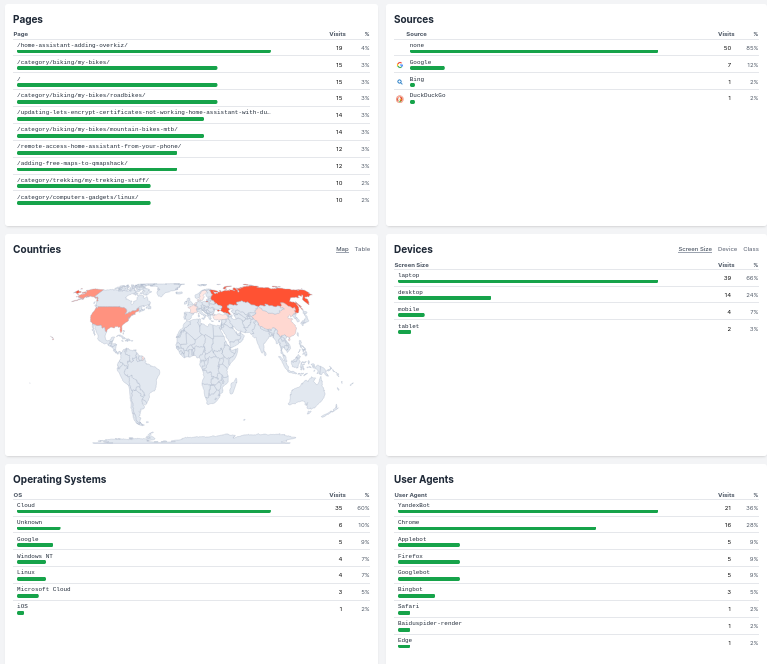
So all is up and running, simple stats, enough for me, again, many thanks to creativerly.com for showing me this.