How to add X-Sense smoke alarms to Home Assistant
A recent update to the X-Sense base station allows the smoke alarms to be integrated into Home Assistant
In the Android app, you have to enter your IP address to the PC running HA, the port, the account name and password. See the photo below
They don't clearly explain the account name and password
Here's how to do it correctly
Example 192.168.1.200:8123. (192.168.1.200: is my IP, obviously, you enter yours, the port 1883 is fairly standard for HA)
Note: even if you use a Docker setup, you use the PC's IP address, not Docker's IP
You need to enter your login and password.
However, this is NOT clearly explained in the Android app.
It is not your Home Assistant login and password, but your MQTT (Mosquitto) credentials.
I was lucky because I had written mine down, as you cannot view them in the Home Assistant settings.
If you do not have your MQTT credentials saved, you will need to recreate your Mosquitto username and password.
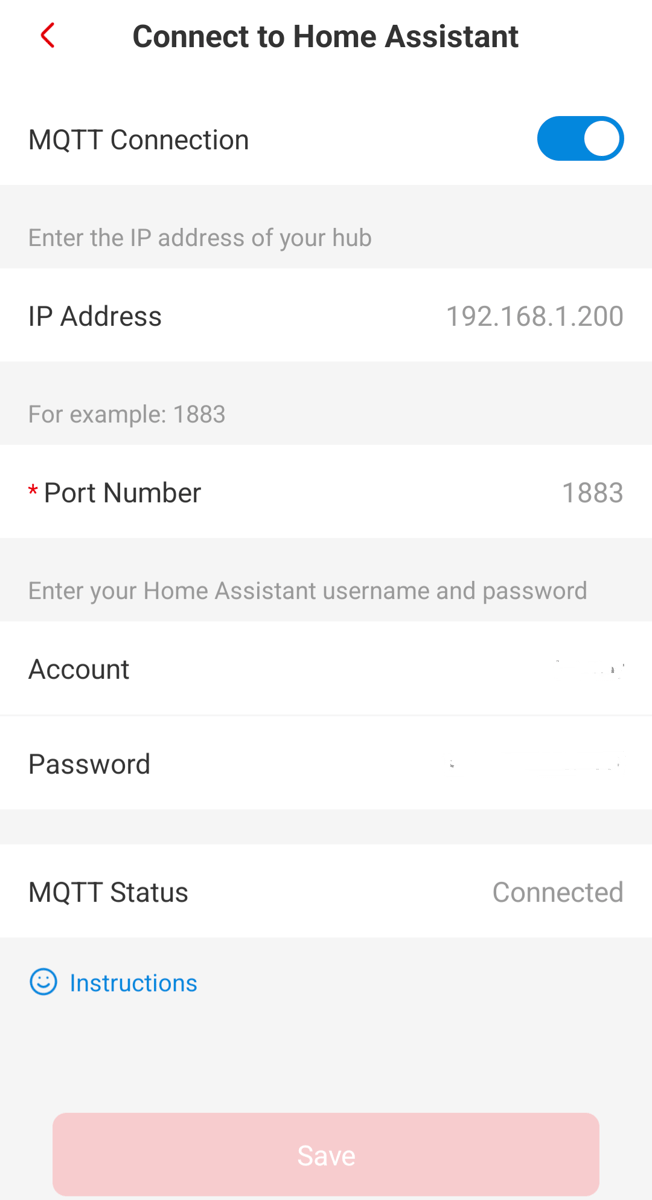
Once the details have been filled in, you will now see MQTT connected at the bottom of the Android app page, and after a while, you will see in MQTT on HA that the X-Sense smoke alarms will be available
Like this post? Buy me a coffee!
Your support means a lot and helps me keep creating useful content ☕😊
https://buymeacoffee.com/minty95