Moving Google Photos to Nextcloud
I have the Google One account for 100 GB of storage—it's not expensive, at about 20€ per year. But since I've recently built my own server from scratch (see here) and installed Home Assistant, WordPress, and Nextcloud, I thought it was time to move my photos from Google to my NC.
In total, I have over 20 GB on Google Photos and want to stop the Google One account, switching back to the standard free 15 GB plan.
Migration Process
Easy, I thought, just copy over the photos from GP to NC, hah, not as easy as that.
Playing around, looking around, I realised I had to download and upload the photos. As many of these photos were sorted in albums, "Holidays 2020", for example, I needed to download album by album from GP. Then upload album by album, Easy I thought, hah, not as easy as that, once again...
Fast forward a bit.
I downloaded an album from GP, This downloads it into a zip format, no sweat. Except, if you delete from GP the downloaded album, the album effectively is deleted, but not the photos; you have to go into the GP timeline and delete them, photo by photo. very time-consuming ...
Once all the albums have been downloaded and deleted, you will then need to download any photos that are not in any albums.
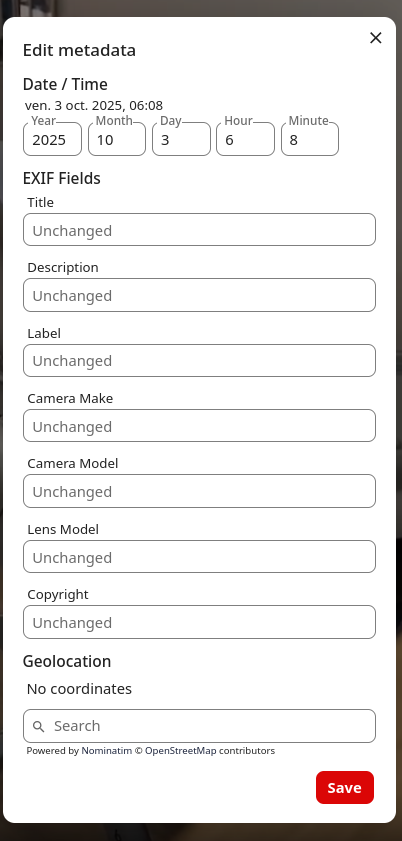
Also, I found that all downloaded videos do not contain any metadata (EXIF headers ), the date, even though they are dated in GP. So, when downloading any videos, name the zip file with the video's date, it will be useful later.
Next on NC.
The standard Photos app is crap, to say the least, so don't use it.
Fast forward again
To save you some reading, go and add the Memories app.
https://memories.gallery/
With this app, you can easily create an album and upload the previously downloaded images to it. (You did unzip them, didn't you ?)
So now you have the same album in NC under the Memories app as you had before in GP, and at the same time, Memories will automatically fill in the standard photo app.
You should, I said should, now also see the images in the standard Photos app. Not as an album, but just images in the timeline. Now there's a pretty good chance that the images in this app are all dated wrong, having the uploaded date rather than the date when the photo was taken, stupido NC. As I said, the standard photo app is crap.
Fixing dates
Don't panic, you just need to run in terminal this : (I'm using Linux)
docker exec -u www-data nextcloud php occ files:scan --all
This script will set the dates correctly in the photo app; for info, the Memories app should do this automatically, over time. (I haven’t had time to see if Memories does this automatically yet; otherwise, I'm going to run the above script)
Attention: see above concerning any downloaded videos, you will need to fill in the dates video by video, one by one, hence naming your downloaded videos with the re date in the name-zipp file. (babyboy 24-11-2025, for example)
Now, I have all my images, most sorted in albums on NC, and my GP account is empty. It took time, but they're sorted correctly and it's done.