Updating Legacy BIOS on a PC Running Linux
Updating Legacy BIOS on a PC Running Linux
Many years ago, I wrote a post on how to update a ZOTAC EI730 PC BIOS using Linux, as I didn’t have a Windows machine. While this method is outdated for modern UEFI systems, it still works perfectly for older PCs with legacy BIOS.
Create a DOS Bootable USB
I used LiteUSB from Freedos https://www.freedos.org/download/.
Download the LiteUSB and uncompress the folder.
In the folder, there will be three files. You only need FD14LITE.img.
Open a terminal either in the unzipped folder or cd into it, and run
sudo dd if=FD14LITE.img of=/dev/sdX bs=4M status=progress && sync
At the time of writing, the version was FD14LITE.img
Change the /dev/sdX to your correct path sda, sdb, sdc etc (double check that, otherwise you could screw up your PC, been there, done that...)
Ok, that's the bootable dos USB made.
Now, to copy the BIOS files to it, at the root level
For example, in my bios folder, I had
AFU303.exe
afuwin.exe
amifldrv32.sys
amifldrv64.sys
B2250723.bin
Note.txt
update.bat
Important_note_AMI_EFI_2.02.pdf
So copy these to the USB. You don't need the xxx.txt or the xxx.pdf
You can now boot into the USB. You might need to change your boot options for your PC to start it, often F8.
Booting into the Freedos, you will have a message
Do you want to proceed? Just CHOOSE No - return to DOS
You will now be into the below DOS screen.
Type in the names of your BIOS files after the C:\> prompt.
Mine were AFU303.exe and B2250723.bin for exemple.
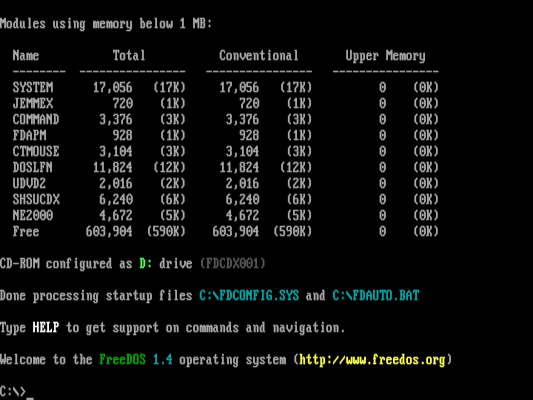
Like this
C:\>afu303.exe B2250723.bin /p /n /b /r (There is a space between the file names and before each slash)
Now hit ENTER and pray ..... (I always pray when updating a bios, because if it goes wrong. Power cut, for instance, you are in the shit ...)
When it's finished, you'll be back to the C:\> prompt, just type reboot.
If necessary, boot into your BIOS to reset any BIOS options that you need.
You now have a new Bios
Like this post? Buy me a coffee!
Your support means a lot and helps me keep creating useful content ☕😊
https://buymeacoffee.com/minty95