Meshtastic - MeshCore
This is an ongoing post about Meshtastic - MeshCore, as I've only just started learning about it. WHY?

In February 2026. While chatting with friends in a small private group, one of the members mentioned MeshCore and Meshtastic ?. And as I'm a curious sod, I looked that up, as it didn't mean anything to me.
Now here's the first thing, there is Meshtastic, and there is MeshCore, as far as I can understand, they are the same, but not the same !!! As clear as mud.
Hmm, that's interesting, I said to myself, even though TBH, the Internet is everywhere, and 4G, now 5G, is almost everywhere here in France.
Note: I have been trekking in the past and have been in areas where there was no telephone access. I actually have a Garmin 66i InReach device https://deafbutnotdead.com/garmin-gpsmap-66i just in case, though the InReach subscription is a little expensive. So with Mechcore or Mechtastic, I can see a use for that if there were more nodes, relays about.
As I'm a wally for new tech, I spent most of that day reading, searching, and trying to understand more about Meshtastic and MeshCore
Now, are there any of these Mesh-xxxx near where I live? For info, I'm moving house in a couple of weeks, so I checked where I'll be living and even where I'm at for the moment
https://meshcore.co.uk/map.html
Whoops, nothing, and nothing even near my homes. France, as usual, in all its splendour.
But WTF, maybe I can try changing that for where I'll live. So fast forward one day. I've already gone and ordered the first mesh device to play with. I placed an order directly from Heltec.org
https://heltec.org/project/mesh-node-t114/#DocsResource
Mesh Node T114 (Rev. 2.0), nRF52840 + SX1262 LoRa Node +GPS, Meshtastic and LoRaWAN Compatible
With a Case, Screen, and GPS, if I have got it right, I can use it, if and when I get out hiking again this year. I have a small Lipo battery ready to be ordered from Amazon, just in case, that can be fitted to make it autonomous.
For the moment, I've not decided which to use or rather, flash on the hardware I've ordered. Apparently, it can do either. And if I understand correctly. It looks like I might even do both, a MeshCore node at home and a Meshtastic with me when out trekking. As that seems the best option from what I've read so far.
Again, if I understand it all, I can slip it into a waterproof case outside my house with a small solar panel to set it up as a node at home. Maybe I'll be the first on the above map in my town. Oh yeah :)
To access the Mesh Node T114 you need to download the Meshtastic app for your 'Dog & Bone', in my case, Android https://meshtastic.org/docs/software/android/installation/ either from the Playstore or the F-Droid app, they're the same app.
For the moment, I am stuck and can't add much more here, as not having received the hardware, and as it's coming from China, a couple of weeks at least, and getting ready to move, it will be silence radio, or should I say silence Meshtastic or MeshCore, until at least the month of March 26
Update 11/02/26
Lipo battery arrived. Whow, aren't they just dinky 🤪

Update 17/02/26
The packet from Heltec arrived today, so a quickish delivery as it comes from China.


Unboxing gives you the T114 board, two antennas, the GPS unit, four screws for the box, two small transparent buttons, some sort of 'combs' that I don't know what they are for, two washers and a nut for fixing the thick antenna
My first steps
I fixed the thin antenna to the board; it just fits on (I read somewhere that you should add an antenna before plugging the board). I then just plugged in the board to my Linux PC. The first problem that I had was that my standard USB-C cable didn't seem to be liked by the T114 as it wasn't recognised properly
It was seen when running sudo dmesg -w | grep -iE "tty|usb"
BUT not when running lsusb, strange
I changed the cable and re-ran lsusb which gave me this
Bus 001 Device 016: ID 239a:4405 Adafruit HT-n5262
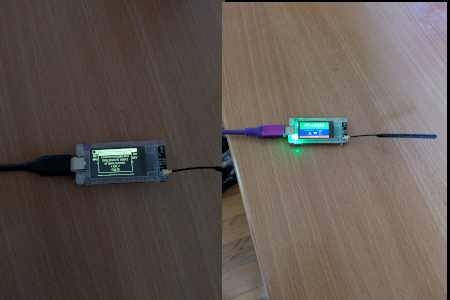
In the above photo, I had the welcome screen that I could never get past if
Starting Chromium on my Arch PC and opening https://flasher.meshtastic.org/ I managed to flash the latest Metastatic version. For info, I tried LibreWolf, but that doesn't work. It's basically Chrome or nothing on Linux.
The flashing isn't difficult, and after a minute or so, it booted into the image below; Metastatic is running.

I then unplugged the power and fitted it into the blue case, with the battery that I had previously bought.
It's a tight fit; you need to be careful
I first fitted the thick antenna and the GPS unit. In case you need to position the GPS unit as in my photo, you can see the correct way to squeeze it in.

Then you position the board properly and add the top of the case with its two transparent buttons
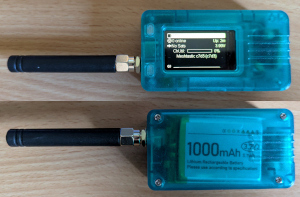
From here, I switched to my phone and opened the Metastatic Android APP
Things that I did
I was able to access it from my phone using the app Mestastic. The first connection pairs the phone and the Heltec, standard Bluetooth pairing, nothing difficult.
It's as I thought. Where I live for the moment, there seems to be nobody near me, or as Roger Waters and Pink Floyd sang, "Is there anybody out there ?"
The unit didn't show any GPS, even though the GPS board was connected, as it showed 'No Sats', which means that the board is detected, just leave it outside for about 20/ 30 minutes, and they'll appear. Every time you reboot, the GPS loses the satellites again. Sometimes they come back, sometimes I sit it out again for a while.
I couldn't access it using Chromium via https://client.meshtastic.org/. I found I needed to add myself to the dialout group on Arch; by default, I wasn't on it, so I ran sudo usermod -aG uucp my_username and rebooted.
This now lets me connect, though, for the moment, I just have a spinning wheel on the web page; apparently, that's due to trying multiple connections to the board, as Mestastic can only accept one at a time. So I disconnected the Android app and the Bluetooth on the board. Even after I disabled the Bluetooth and the Android app, it's still not working.
Later, I also tried using https://client.meshtastic.org/ on the phone using BT, but again was stuck with just a spinning wheel. I checked on Github others are complaining about that as well, I am not alone.
I added a second channel, France, and the LongMod Channel, so now I have two. Sadly, where I live, nobody is using Meshtastic, so whatever, for the moment, it's quiet out here.
Changed the Bluetooth pin to Fixed. Strangely, you cannot start the fixed pin with a 0, but you can have a 0 inside the pin, just not at the start
So far, that's all I've managed. Earlier this morning, taking it with me while in town, I saw that I was connected to four nodes, though nobody to chatter to. Still, it's a start.
Update 23/02/2026
I was in a bigger town, I actually received an answer back to a test message. It's a start, but it was using the France channel and MQTT, so I do not know where the reply came from
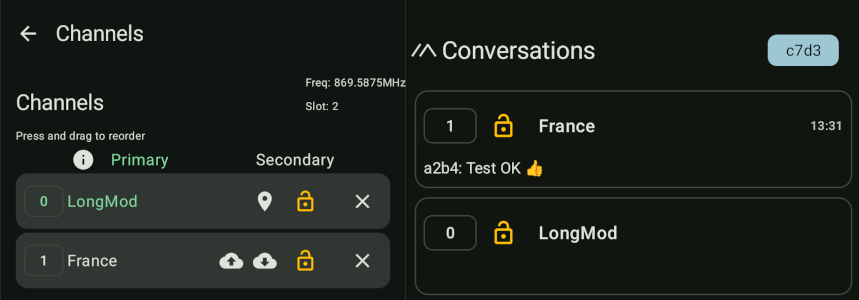
To do the above? I cheated, using AI to help me :
Steps to add France secondary channel
- Open Meshtastic app > Channels tab > tap the three dots (top right) > "Add Channel".
- Set Name: "France" (or leave blank for public default).
- Set PSK: AQ== (the standard public key for LongFast and France channels).
- Set Role: Secondary.
- Enable Uplink and Downlink (for MQTT/internet relay).
- Frequency Slot: Override to 20 (EU default for public LongFast).
- Save—it will push to your T114 and reboot briefly.
What this does
Your primary LongFast stays private/personal, while the secondary France channel connects you to the national mesh (via MQTT until local LoRa links form).
The details and links below were pulled from either AI or the web
Overview of Meshtastic and MeshCore
Both Meshtastic and MeshCore are open-source platforms designed for creating decentralised mesh networks using LoRa technology.
Key Differences
Network Structure
Feature |
Meshtastic |
MeshCore |
|---|---|---|
Default Role |
Client (rebroadcasts messages) |
Companion (does not rebroadcast) |
Infrastructure |
Ad-hoc, flexible client-based mesh |
Fixed repeaters for stable connections |
Hop Limit |
Max 7 hops |
Up to 64 hops |
Communication Style
Feature |
Meshtastic |
MeshCore |
|---|---|---|
Routing Method |
True mesh with client routing |
Flood messaging via repeaters |
Responsiveness |
Slower due to multiple relays |
Faster with dedicated repeaters |
Telemetry |
More frequent updates |
Less frequent, manual pulling |
This web page explains Meshcore vs Mestastic far better than I ever could ever do.
https://brokensignal.tv/pages/meshcore-vs-meshtastic.html
_______________
This blog is in French; it's very good, well-written and very informative. He seems to be doing the same as me but far more advanced.
https://fourbi.eu/billet/2025-11-10-notes-d-exploration-lora-n1
_______________
We connect people and things, without using the internet
https://meshcore.co.uk/
_______________
It looks like I'm going to have fun with all this. It's exactly what I love doing and learning about.